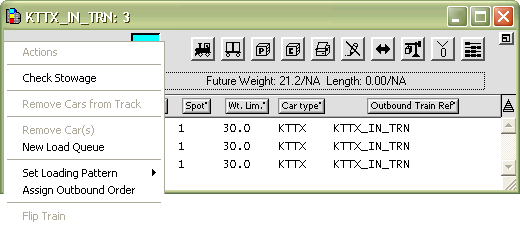
The Actions drop-down list in the XPS client Train window contains commands for working with inbound or outbound trains, based on what kind of train is open.
Outbound commands
Check Stowage - Check for stowage violations (VCG, Weight, and Height).
Remove Cars from Track - Remove the selected railcars from the track to the "community", where they are available, but out of the way. Use only if there are complications with advancing the train visit (to Departed) using the Advance the Train Visit form in the N4 client. See Departing the train (on page 1) for more information.
Remove Car(s) - Remove the selected railcars from the open outbound train. The XPS client places removed railcars in the Available Cars List for reuse.
New Load Queue - Create a new load queue for the open train.
Set Loading Pattern - Determine how the rail car should be loaded: tier wise or stack wise
Assign Outbound Order - Assign an outbound order to the railcars displayed in the train window. The outbound order must match the order of the railcars as arranged on the outbound train. When this command is selected, N4 assigns an outbound order according to order of the cars as displayed in the train window.
For the commands in the Actions drop-down list for inbound trains, see Actions drop-down list: inbound Train window (on page 1).